> For the complete documentation index, see [llms.txt](https://docs.greennode.ai/llms.txt). Markdown versions of documentation pages are available by appending `.md` to page URLs; this page is available as [Markdown](https://docs.greennode.ai/vstorage/object-storage/object-storage-hcm04/cac-tinh-nang-cua-object-storage/lam-viec-voi-bucket/working-with-buckets-via-vstorage-portal/bucket-event-notification.md).
# Bucket Event Notification
**Event Notification** in vStorage is a feature that allows you to receive notifications about events that occur in your bucket as a JSON file, such as when an object is uploaded, deleted, or overwritten.
1\. Log in to [https://vstorage.console.greennode.ai](https://vstorage.console.greennode.ai/storage/list) .
2\. Select **the project** containing **the bucket** you want to set up event notification for.
**3. Select the Action** icon and select **Configure event notification.**
4\. Select **Create an Event notification** .
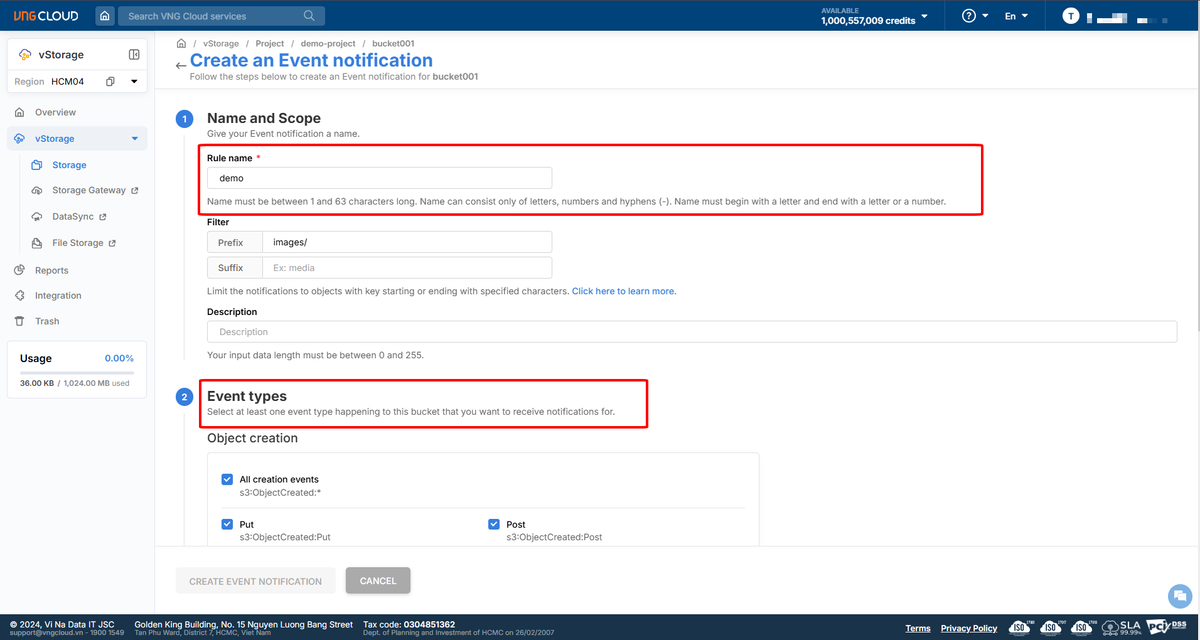
5\. Here, configure Event Notification information including:
* **Rule name** : The name that reminds you of the Event Notification, this name must be unique on your account and the rule name must be from 1 to 63 characters. Characters can include letters, numbers and hyphens (-). The rule name must start and end with a letter.
* **Filter:** select the event receiving scope
* **Prefix** : Only track events with objects that have a specific prefix (eg: `images/`).
* **Suffix** : Only track events with objects that have a specific suffix (eg: `.jpg`).
* **Description** : enter a description for the rule.
* **Event types** : You can select one or more event types to track. Common events include:
* **Object Creation:** Includes all events when an object is created, including PUT, POST, COPY, and the Complete Multipart Upload action.
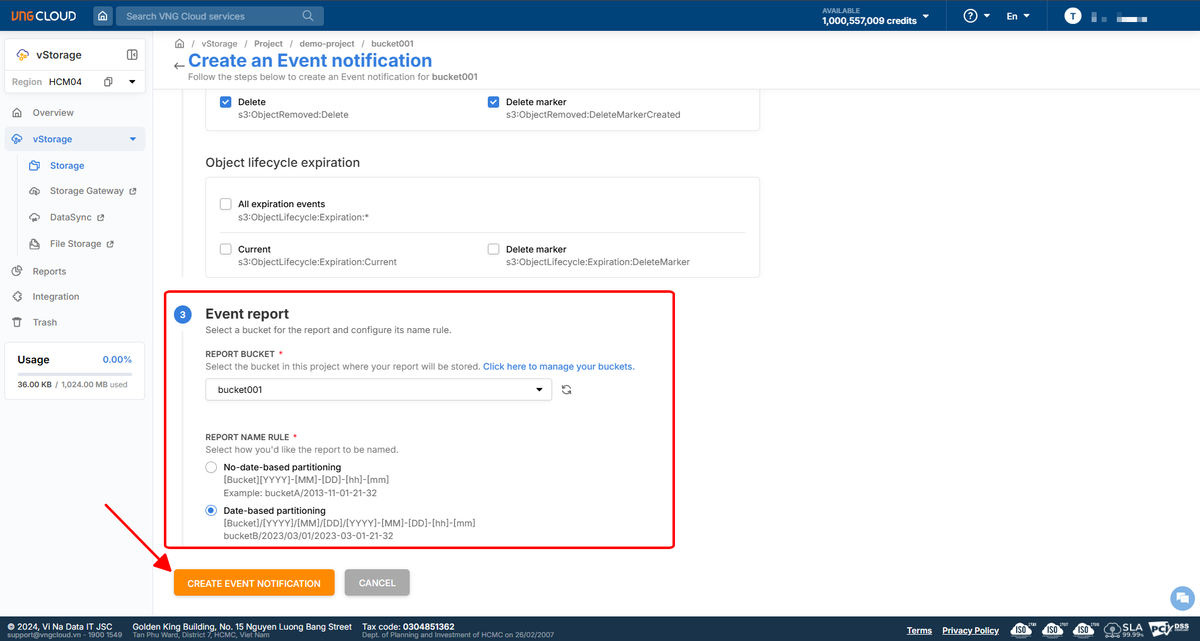
* **Object Removal** : Tracks events when an object is deleted, including Delete, Delete Marker
* **Object Lifecycle Expiration:** Tracks events when a lifecycle expiration runs on a bucket, including Expire Current version of object, Delete Marker
* **Report Bucket** : Select the destination bucket to receive Event notifications. We recommend that you create separate buckets specifically for storing Event notifications for Auditing.
* **Report Name Rule:** Select the naming and folder division for events.
* **No-date-based partitioning** :
* The JSON file will be saved with a name that includes the bucket name and the save time, without a date-based folder structure. Suitable if you don't need to manage files by date-based folder.
* File name structure: `[Bucket][YYYY]-[MM]-[DD]-[hh]-[mm]`.
* Example: `bucketA/2013-11-01-21-32`(bucket name + date time).
* **Date-based partitioning** :
* The JSON file will be saved in folders by each part of the date (year/month/day), helping to divide the data by each day for easy retrieval. Suitable if you need to organize data by day for easier management in case of multiple reports.
* Folder structure and file names: `[Bucket]/[YYYY]/[MM]/[DD]/[YYYY]-[MM]-[DD]-[hh]-[mm]`.
* For example:`bucketB/2023/03/01/2023-03-01-21-32`
5\. Select **Create event notification** to initiate this event.
{% hint style="info" %}
**Attention:**
* **Avoid duplicate events** : If you have multiple Event Notification configurations for the same event, your chosen bucket may have to store multiple JSON files. This can be resource-intensive, so be careful to avoid duplicates.
{% endhint %}