> For the complete documentation index, see [llms.txt](https://docs.greennode.ai/llms.txt). Markdown versions of documentation pages are available by appending `.md` to page URLs; this page is available as [Markdown](https://docs.greennode.ai/vn/vmonitor/dashboards/synthetics/lam-viec-voi-location/private-location.md).

# Private location

Private Locations cho phép bạn theo dõi các ứng dụng/dịch vụ nằm trong mạng nội bộ của bạn hay bất kì private endpoints nào mà không thể truy cập từ internet.

**Để thực hiện tạo Private Location, hãy làm theo hướng dẫn bên dưới:**

1. Đăng nhập vào vMonitor Platform [tại đây.](https://vmonitor.console.greennode.ai/)
2. Chọn thư mục **Synthetic test.**
3. Chọn **Location.**
4. Chọn **Create a location.**
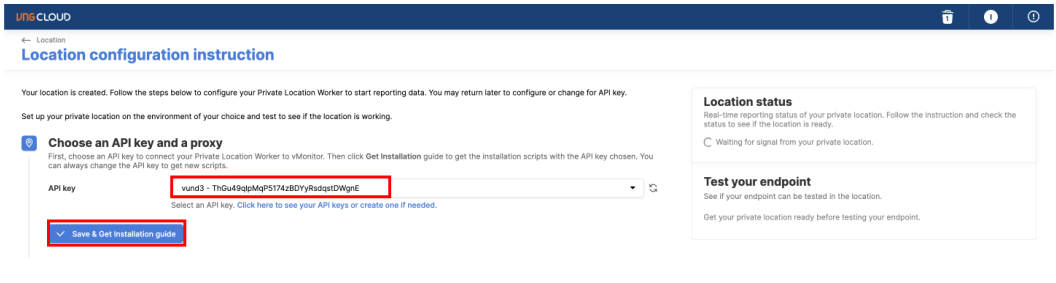
5. Bước kế tiếp **chọn API Key** để có thông tin xác thực giữa Private Location và GreenNode và chọn S**ave & Get Installation Guide** để hệ thống sinh ra các cấu hình và câu lệnh cần thiết để bạn cài đặt

<figure><img src="https://3672463924-files.gitbook.io/~/files/v0/b/gitbook-x-prod.appspot.com/o/spaces%2FB0NrrrdJdpYOYzRkbWp5%2Fuploads%2Fgit-blob-b5c56617f831f72809eef26b0c8c80f1d8ca3fd0%2Fimage.png?alt=media" alt=""><figcaption></figcaption></figure>

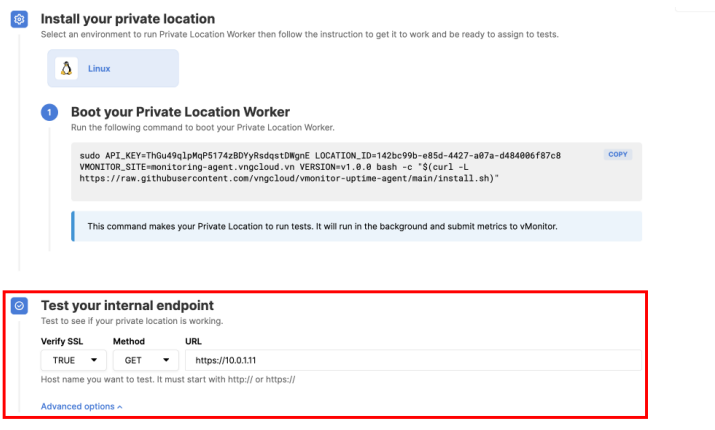
6. Hệ thống sẽ sinh ra câu lệnh để bạn cài đặt Synthetic Worker trên Private Location, bạn chỉ cần sao chép câu lệnh và cài đặt

<figure><img src="https://3672463924-files.gitbook.io/~/files/v0/b/gitbook-x-prod.appspot.com/o/spaces%2FB0NrrrdJdpYOYzRkbWp5%2Fuploads%2FrqQmfDMzeYCANVS2QM1x%2Fimage.png?alt=media&amp;token=05b8b43b-d3b1-4540-ba88-68e5c894d44e" alt=""><figcaption></figcaption></figure>

7\. Cài đặt Synthetic Worker với câu lệnh trên

<figure><img src="https://3672463924-files.gitbook.io/~/files/v0/b/gitbook-x-prod.appspot.com/o/spaces%2FB0NrrrdJdpYOYzRkbWp5%2Fuploads%2Fgit-blob-e02569ba47f6bc50b1ae1246bf4d071fa487535b%2Fimage.png?alt=media" alt=""><figcaption></figcaption></figure>

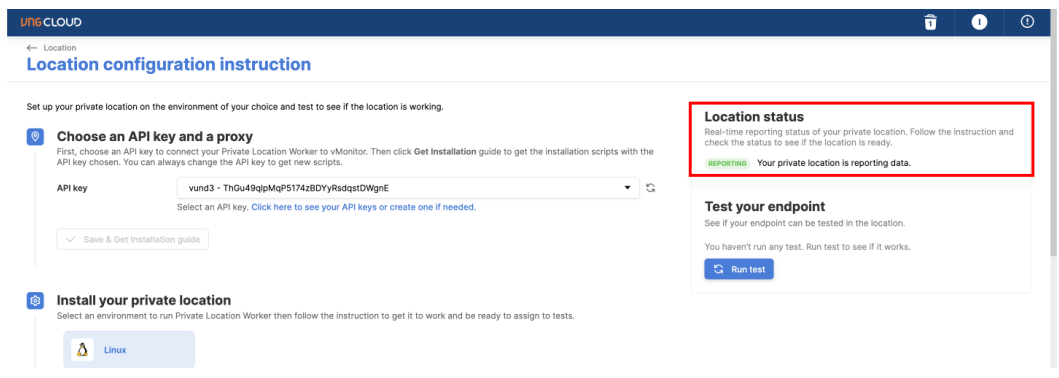
8\. Sau khi quá trình cài đặt Synthetic Worker hoàn thành bạn sẽ thấy vMonitor report đã kết nối thành công

<figure><img src="https://3672463924-files.gitbook.io/~/files/v0/b/gitbook-x-prod.appspot.com/o/spaces%2FB0NrrrdJdpYOYzRkbWp5%2Fuploads%2Fgit-blob-be4abece280b08ae2c813965b70ea04b37f26817%2Fimage.png?alt=media" alt=""><figcaption></figcaption></figure>

9\. Bạn có thể điền một internal endpoint để kiểm tra xem hệ thống có hoạt động thành công không

<figure><img src="https://3672463924-files.gitbook.io/~/files/v0/b/gitbook-x-prod.appspot.com/o/spaces%2FB0NrrrdJdpYOYzRkbWp5%2Fuploads%2Fgit-blob-8b27acb447aec0b30bdc45b9d7ffd7baaf47796b%2Fimage.png?alt=media" alt=""><figcaption></figcaption></figure>

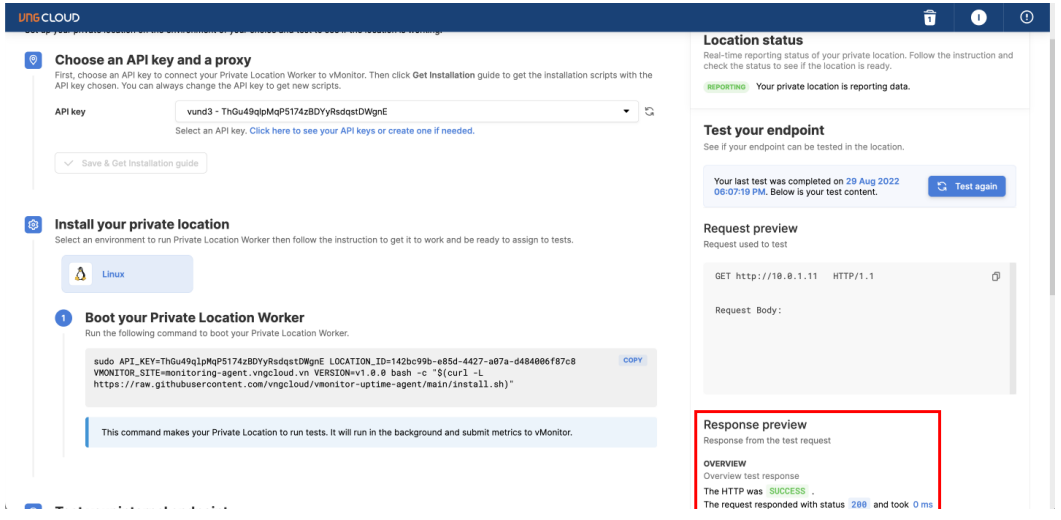
10\. Kết quả Test internal endpoint đã thành công

<figure><img src="https://3672463924-files.gitbook.io/~/files/v0/b/gitbook-x-prod.appspot.com/o/spaces%2FB0NrrrdJdpYOYzRkbWp5%2Fuploads%2Fgit-blob-39499cf53fcdaa4fb17499488b40bae14dbe27e1%2Fimage.png?alt=media" alt=""><figcaption></figcaption></figure>

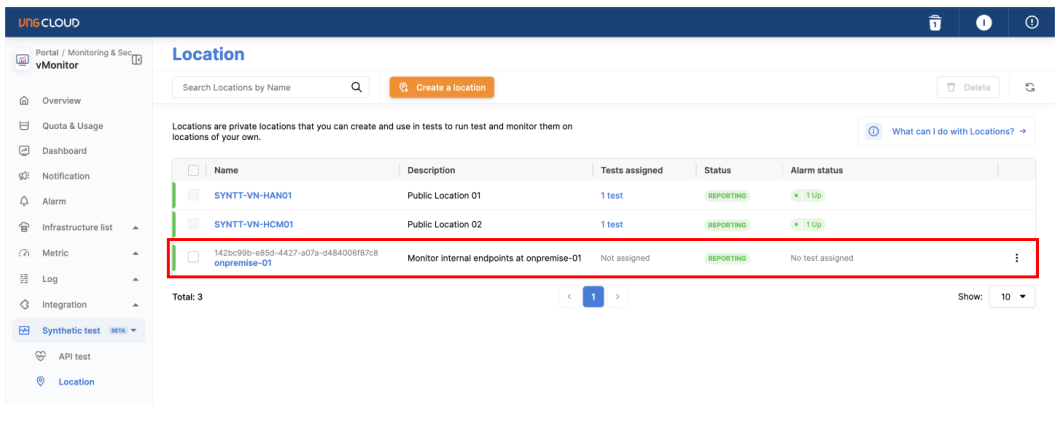
11\. Ngoài ra bạn cũng có thể xem trạng thái của Private Location ở ngoài trang Location
<figure><img src="https://3672463924-files.gitbook.io/~/files/v0/b/gitbook-x-prod.appspot.com/o/spaces%2FB0NrrrdJdpYOYzRkbWp5%2Fuploads%2Fgit-blob-1f057db881d5a6d46ea6430645f8b2aad6dcdb71%2Fimage.png?alt=media" alt=""><figcaption></figcaption></figure>