> For the complete documentation index, see [llms.txt](https://docs.greennode.ai/llms.txt). Markdown versions of documentation pages are available by appending `.md` to page URLs; this page is available as [Markdown](https://docs.greennode.ai/vn/vmonitor/dashboards/logs/lam-viec-voi-log-pipeline/processor/field-remapper.md).

# Field Remapper

### Tổng quan

Field Remapper là một tính năng cho phép bạn thêm field, xóa field, thay đổi tên của field hay thay đổi kiểu dữ liệu của các field trong dữ liệu.

***

### Cấu hình Field Remapper

Để sử dụng Field Remapper, hãy làm theo hướng dẫn bên dưới:

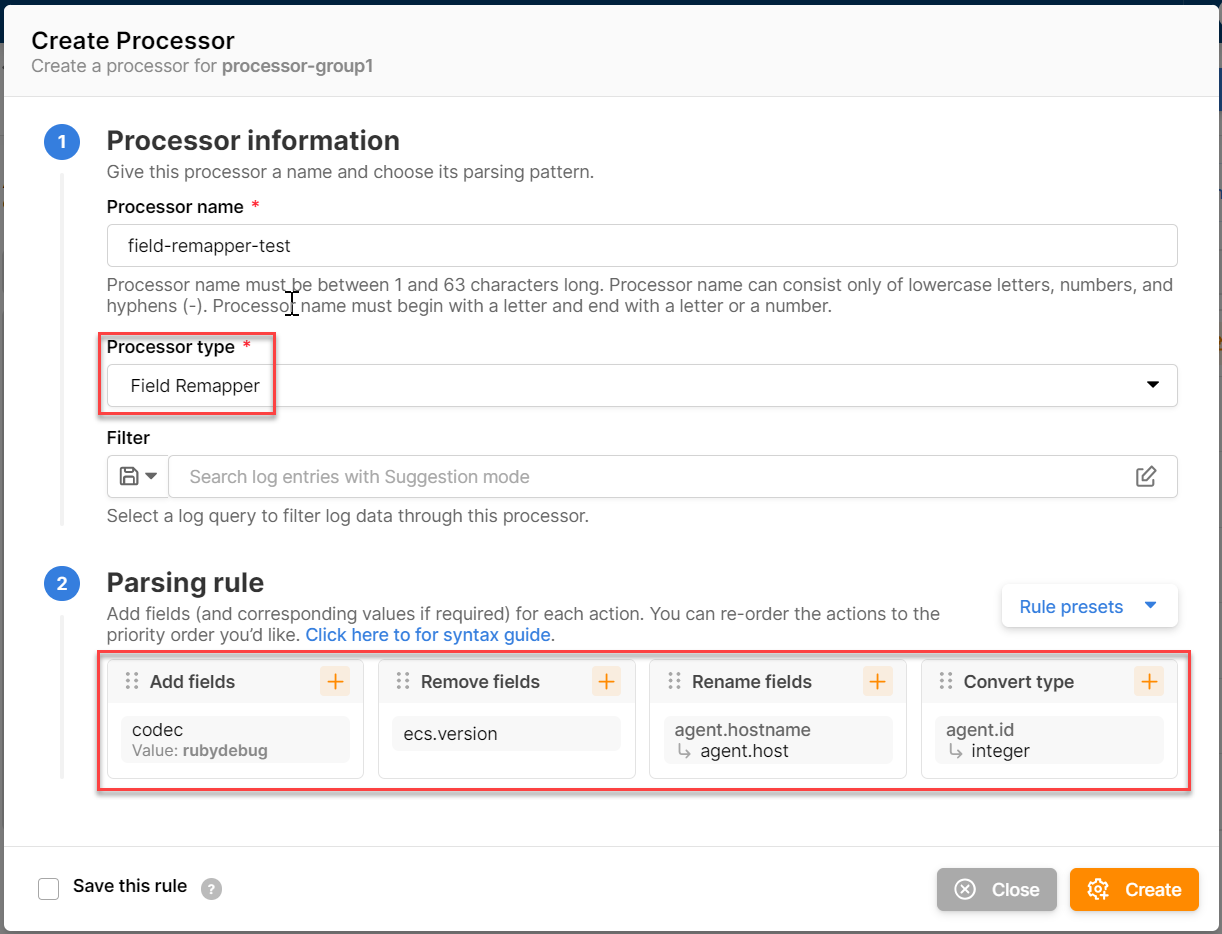
1. Tại mục **Processor information**, nhập các thông tin chung cho một processor theo hướng dẫn tại [Processor](/vn/vmonitor/dashboards/logs/lam-viec-voi-log-pipeline/processor.md). Trong nội dung này thì bạn sẽ chọn **Processor type** là **Field Remapper**.
2. Tại mục **Parsing rule**, nhập các thông tin sau đây:

* **Add fields**: thêm bất kì 1 cặp giá trị nào. Cặp giá trị thêm vào phải theo cấu trúc **Field**, **Value**.
* **Remove fields**: xoá các fields đang có sẵn trong logs.
* **Rename fields**: đổi tên của fields.
* **Convert type:** đổi kiểu dữ liệu của fields

Ví dụ:

<table data-full-width="true"><thead><tr><th>Items</th><th>Value</th><th>Ý nghĩa</th><th>Source logs</th><th>Destination logs</th></tr></thead><tbody><tr><td><strong>Add fields</strong></td><td><p>Key: codec</p><p>Value: rubydebug</p></td><td>Thêm field <strong>codec</strong> với value là <strong>rubydebug</strong> vào destination logs.</td><td>{ "@timestamp": "2023-08-02T06:35:08.017Z", "agent.id": "12002", "type": "vMonitor", "agent.hostname": "VNGCLOUD", "date": "2023-08-01T07:45:11.130Z", "client_ip": "45.61.164.120", "esc.version": "-" }</td><td>{ "@timestamp": "2023-08-02T06:35:08.017Z", "agent.id": "12002", "type": "vMonitor", "agent.hostname": "VNGCLOUD", "date": "2023-08-01T07:45:11.130Z", "client_ip": "45.61.164.120", "esc.version": "-" }</td></tr><tr><td><strong>Remove fields</strong></td><td>esc.version</td><td>Loại bỏ field <strong>esc.version</strong> khỏi destination logs.</td><td>nt</td><td>nt</td></tr><tr><td><strong>Rename fields</strong></td><td><p>Field: agent.hostname</p><p>Name: agent.host</p></td><td>Đổi tên field <strong>agent.hostname</strong> thành <strong>agent.host</strong> tại destination logs.</td><td>nt</td><td>nt</td></tr><tr><td><strong>Convert type</strong></td><td><p>Field: agent.id</p><p>Type: Integer</p></td><td>Chuyển loại dữ liệu của field <strong>agent.id</strong> từ <strong>string</strong> thành <strong>Interger</strong>.</td><td>nt</td><td>nt</td></tr></tbody></table>

<figure><img src="/files/kf7L3kCSYa3Vti8AOb5M" alt=""><figcaption></figcaption></figure>

***

### Lưu trữ và tái sử dụng Parsing rule

* Bạn có thể lưu trữ một parsing rule bằng cách tích chọn vào **Save this rule**, sau đó nhập tên gợi nhớ cho parsing rule mà bạn muốn lưu trữ. Tên gợi nhớ có chiều dài tối thiểu là 5 ký tự, chiều dài tối đa là 255 ký tự và chỉ có thể bao gồm các chữ cái viết hoa, viết thường (a-z, A-Z), số (0-9), dấu chấm (.), khoảng trắng ( ), dấu gạch dưới (\_), dấu gạch ngang (-) và ký tự @.
* Sau khi parsing rule đã được lưu trữ, trong các lần tạo processor kế tiếp bạn có thể tái sử dụng rule này bằng cách chọn **Rule presets** tại mục Pasing rule.
