> For the complete documentation index, see [llms.txt](https://docs.greennode.ai/llms.txt). Markdown versions of documentation pages are available by appending `.md` to page URLs; this page is available as [Markdown](https://docs.greennode.ai/vn/vdb/opensearch-cluster-database-ods/cac-tinh-nang-cua-opensearch-cluster/chinh-sua-opensearch-cluster/tang-so-luong-node.md).
# Tăng số lượng node
Trong dịch vụ vDB OpenSearch của **GreenNode**, bạn có thể dễ dàng mở rộng số lượng node để tăng cường hiệu suất và khả năng chịu tải. Hiện tại, chúng tôi **chỉ hỗ trợ tăng số node** và chưa hỗ trợ giảm số node.
Để tăng số node cho một OpenSearch Cluster, bạn có thể:
**Bước 1:** Truy cập vào
**Bước 2:** Chọn mục **Cluster** trên mục **OpenSearch**
**Bước 3:** Chọn biểu tượng tại cluster mà bạn muốn tăng node sau đó chọn action **Resize Number of Nodes.**
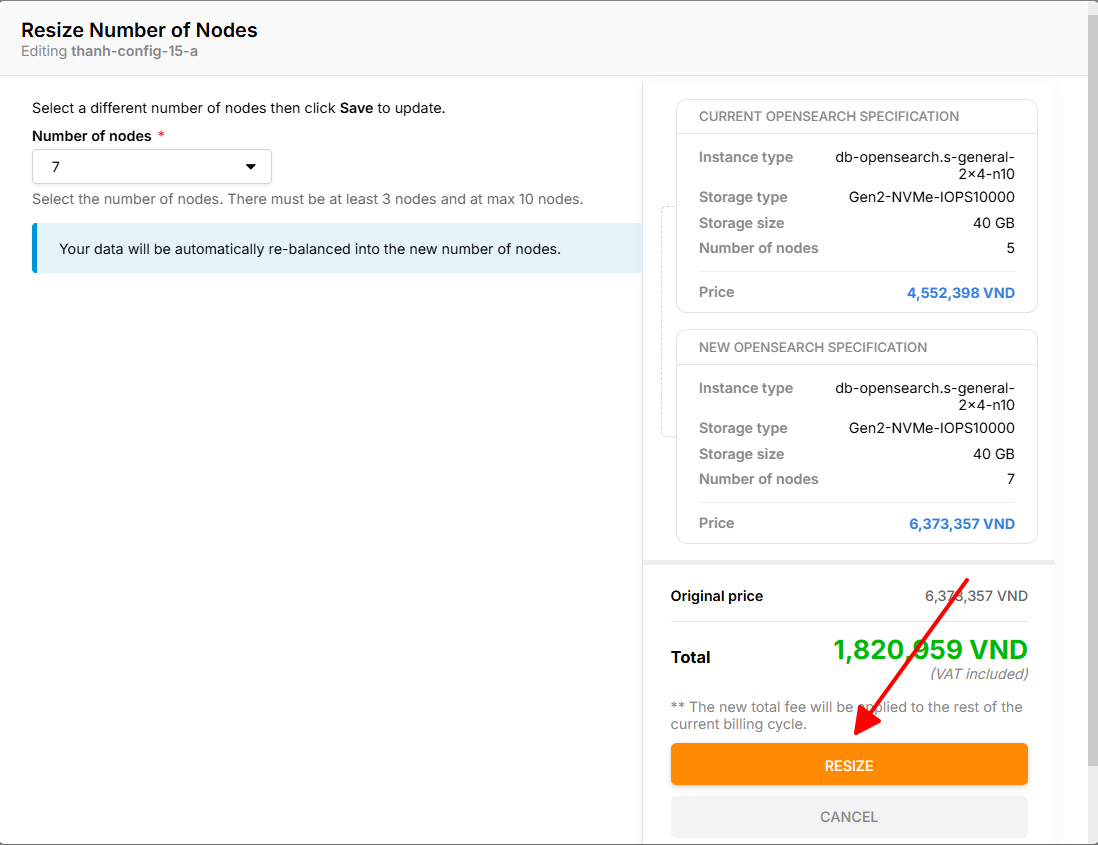
**Bước 4:** Màn hình **Resize Number of Nodes** được hiển thị**.** Chọn số lượng nodes mà bạn mong muốn cluster tăng thêm.
**Bước 5:** Chọn **Resize** và thực hiện thanh toán các bước (nếu có) khi bạn là người dùng trả trước.
Sau khi bạn thực hiện thành công các bước trên, tổng số nodes mới sau khi thay đổi sẽ được cập nhật trên thông tin chung của cluster mà bạn chọn.
 tại cluster mà bạn muốn tăng node sau đó chọn action **Resize Number of Nodes.**
**Bước 4:** Màn hình **Resize Number of Nodes** được hiển thị**.** Chọn số lượng nodes mà bạn mong muốn cluster tăng thêm.
**Bước 5:** Chọn **Resize** và thực hiện thanh toán các bước (nếu có) khi bạn là người dùng trả trước.
tại cluster mà bạn muốn tăng node sau đó chọn action **Resize Number of Nodes.**
**Bước 4:** Màn hình **Resize Number of Nodes** được hiển thị**.** Chọn số lượng nodes mà bạn mong muốn cluster tăng thêm.
**Bước 5:** Chọn **Resize** và thực hiện thanh toán các bước (nếu có) khi bạn là người dùng trả trước.