> For the complete documentation index, see [llms.txt](https://docs.greennode.ai/llms.txt). Markdown versions of documentation pages are available by appending `.md` to page URLs; this page is available as [Markdown](https://docs.greennode.ai/vcolocation/ticket-request/open-a-ticket.md).
# Open a ticket
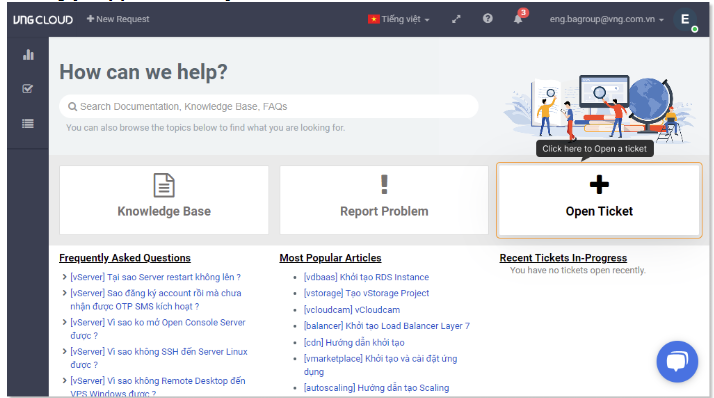
On the request management page, click "Open Ticket" to create a new ticket.
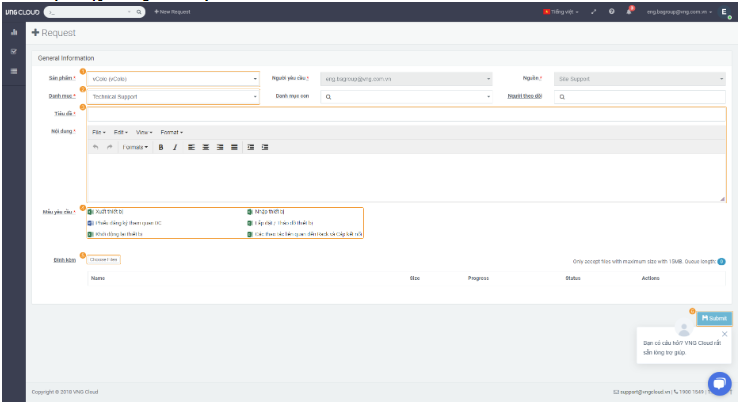
#### Ticket Information Input Interface:
#### Explanation of the steps:
1. **Select the vColo product.**
2. **In the category field, select the ticket type, for example: Technical support.**
3. **Enter the information describing the request.**
4. **You can download the template files to fill in the detailed information of the request.**
5. **Attach the template files after entering the information, or you can attach other necessary files to provide information to fulfill the request.**
6. **Click Submit to send the request.**