> For the complete documentation index, see [llms.txt](https://docs.greennode.ai/llms.txt). Markdown versions of documentation pages are available by appending `.md` to page URLs; this page is available as [Markdown](https://docs.greennode.ai/vcolocation/space-list/view-rack-layout.md).
# View rack layout
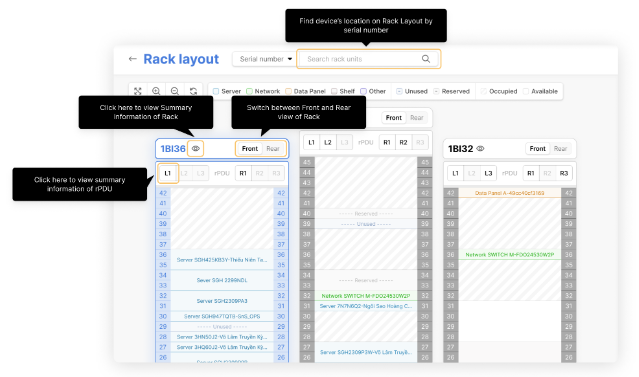
Know the exact location of the device on the rack, the devices are distinguished by different colors according to the type of device: Server, Network device, Data panel, Shelf, and Other (other device types).
#### In the rack layout page, you can:
#### View the ownership status of Rack Units
Allows you to distinguish Rack Units by their ownership status:
* **Unused:** Rack units owned by you but have no equipment installed on them.
* **Reserved:** Rack units reserved for you.
* **Occupied:** Rack units owned by other customers.
* **Available:** Rack units not reserved or rented by anyone.
#### View Rack Overview Information
You can view an overview of each Rack in this interface, including:
* **Rack location:** Site, Floor, Room, Cage.
* **RU height:** The height of the cabinet in U.
* **Used/Free Front/Rear RU:** The number of used/free RUs.
* **Power information (R/B/M),** where:
* R = Rated power, the design power of the rack.
* B = Budgeted power, the allowed power of the rack.
* M = Measured power, the instantaneous measured power of the rack.
* **Instantaneous temperature and humidity information.**
* **Max load (kg):** The load capacity (weight) of the rack.
* **Total weight (kg):** The total weight of the equipment placed on the rack.
* **Total device:** The total number of devices currently placed on the rack.
#### View rPDU Parameters
You can view the parameters of each rPDU according to their installation location (L1, L2, L3, R1, R2, R3).
* **rPDU ID:** The identifier of the rPDU.
* **rPDU type:** The type of rPDU (1PH: 1 phase, 3PH: 3 phases).
* **Vendor:** The manufacturer's name.
* **Model:** The model of the rPDU.
* **Rack:** The rack containing the rPDU.
* **Position:** The position of the rPDU in the rack (L1, L2, L3, R1, R2, R3).
* **Statistics on the number of power sockets on the rPDU:** total/free (total number of sockets/number of unused sockets).
* **Power parameters of the rPDU:**
* Power (R/B/M) (kW): Rated/Budgeted/Measured.
* V (R/B/M): Rated/Allowed/Measured voltage.
* PF (R/B/M): Rated/Allowed/Measured power factor.
* I (R/B/M): Rated/Allowed/Measured current.
#### Search for equipment installation location by serial number
You can easily locate the equipment on the rack by using the search function by Serial number of the device.
#### Notes
Some information will not be displayed for racks rented individually by Rack Unit.
#### Features in Space list:
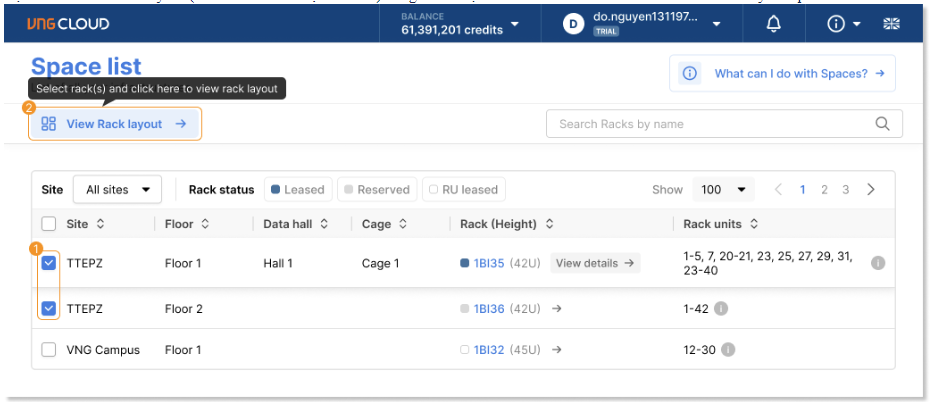
* **View rack layout:** View the layout of equipment on the rack.
* **View details:** View detailed information of the rack.
* **Filter list:** Filter the list of racks, rack units, and cages.