> For the complete documentation index, see [llms.txt](https://docs.greennode.ai/llms.txt). Markdown versions of documentation pages are available by appending `.md` to page URLs; this page is available as [Markdown](https://docs.greennode.ai/vcdn/chi-tiet-tinh-nang/security-link.md).
# Security Link
## **Secure Token**
Secure tokens are structured codes that protect content from being stolen and distributed elsewhere. On vCDN, we support you to enable the Secure token feature when creating or editing a previously created CDN.
***
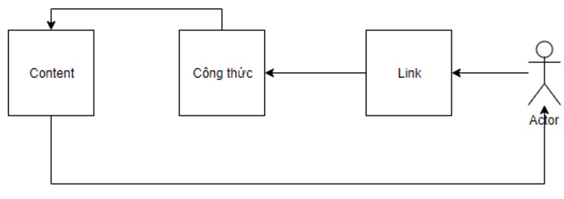
## Operational diagram
When the end user needs to access the content that has been set to activate the "Secure token", the system will check the request to see if it satisfies the formula or not. If it satisfies, the end user can get the content. If not, the request will be rejected.
In there:
* **Passphase** : is the key that comes with the formula you have set up so that the system can recognize that access has been granted.
* **Include client IP** : is the IP of the end user requesting content.
* For "Secure token" to work, the service administrator needs to integrate KEY into the system. Depending on the Token Type, there will be different KEY generation formulas, specifically:
* **VNG** :
* **URL Format** : http(s)://\/\/\/\
* **\** : md5(\\\\)
* **\:** The URL's expiration epochtime, in milliseconds
* **\** : /path/to/media/xxx.\[m3u8|ts|mpd|dash] (ie \ leaves out the xxx.\[m3u8|ts|mpd|dash] part, in this example it would be: /path/to/media)
* **\** : The IP of the client that is authorized to access the content, provided only in case you have selected to enable "Include IP" in the CDN service configuration
* Example:
* **SBD** :
* **URL Format** : http(s)://\/\/\/\
* **\** : md5(\ **:<** Passphare> **:** \ **:** \)
* **\** : The URL's expiration epochtime, in seconds
* **\:/path/to/media** /xxx.\[m3u8|ts|mpd|dash] (ie \ leaves out the xxx.\[m3u8|ts|mpd|dash], in this example it would be: /path/to/media)
* **\** : The IP of the client that is authorized to access the content, provided only in case you have selected to enable "Include IP" in the CDN service configuration
* **Akamai** :
* Refer to the instructions from Akamai's document at:
***
## **Using CORS feature**
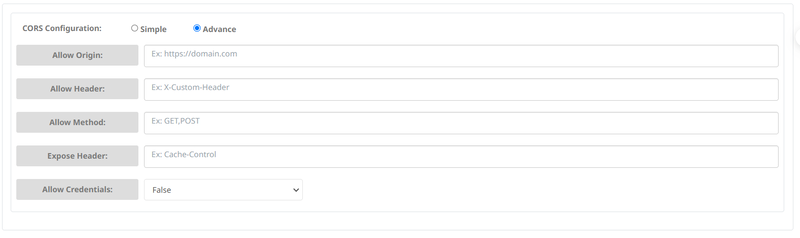
CORS is a vCDN output security feature that allows access with configurations such as: domain name, IP address, Header, Method, Expose Header to access the vCDN output Link.
***
## **Create a Whitelist / Blacklist IP**
* **WhiteList IP:** You can add IP lists of Origins that are allowed to access the output link by selecting **Allow** and entering **the IP Address** or **CIDR** you want:
* **BlackList IP:** In addition, you can also block IPs that do not allow Origin to access the output link of vCDN:
***
## **Geo Block**
* Additionally, you can create a list of origins in which countries the output link can be accessed by selecting **Allow** and entering the desired **country code :**
* You can also set to not allow Origins in a certain country to access the output link by selecting **Block** and entering the desired **country code :**
***
## **HTTP Referer Block**
* You can allow Origins with domains in the list to access the output link by selecting **Allow** and entering the desired **domain :**
* Finally, you can disallow Origin to have domains in the list that can access the output link by selecting **Block** and entering the desired **domain :**