> For the complete documentation index, see [llms.txt](https://docs.greennode.ai/llms.txt). Markdown versions of documentation pages are available by appending `.md` to page URLs; this page is available as [Markdown](https://docs.greennode.ai/ai-stack/ai-platform/inference.md).

# Inference

The Inference feature allows you to deploy AI models as ready-to-use API services, enabling direct integration with backend applications, websites, or data processing pipelines.

Overview of Inference

* Deploy models from Model Registry as REST API endpoints.
* Supports selecting compute resources (CPU/GPU) based on performance requirements.
* Automatically scales based on request traffic.
* Can integrate with AI Gateway for security management, rate limiting, authentication tokens, and more.

***

## Steps to Deploy Inference

#### **Step 1: Access the Inference Interface**

1. Log in to [GreenNode AI Platform](https://aiplatform.console.greennode.ai/overview)..
2. Navigate to Inference from the left-hand menu.
3. Click the “**Create endpoint**” button.

#### **Step 2: Provide Inference Configuration**

| Field             | Description                                                           |
| ----------------- | --------------------------------------------------------------------- |
| **Endpoint Name** | A unique endpoint identifier (1–50 characters, no special characters) |
| **Region**        | Deployment region (currently: HCM)                                    |
| **Model**         | Select a model already imported into **Model Registry**               |

#### **Step 3: Configure Resources and Auto Scaling**

* **Resource Configuration**

<table><thead><tr><th width="209">Parameter</th><th>Description</th></tr></thead><tbody><tr><td><strong>Instance Type (CPU / GPU / RAM)</strong></td><td>Select the compute instance to run the model (e.g., g1-standard-4x16-1rtx2080ti). Choose based on your model’s inference requirements.</td></tr></tbody></table>

* **Replica Configuration**

<table><thead><tr><th width="294">Parameter</th><th>Description</th></tr></thead><tbody><tr><td><strong>Min Replica Count</strong></td><td>Minimum number of instances always available</td></tr><tr><td><strong>Max Replica Count</strong></td><td>Maximum number of instances during autoscaling</td></tr><tr><td><strong>Auto-scaling Settings (Advanced configuration)</strong></td><td>The system automatically scales based on thresholds such as CPU, RAM, GPU utilization, and response latency.</td></tr></tbody></table>

#### **Step 4: Select Security**

* If Private Access is selected, the Endpoint URL requires authentication using an API Key (you must create an API Key before creating Inference).
* If not selected, the Endpoint URL will be publicly accessible (no API Key required).

<figure><img src="/files/5dizwGeXwLAi6UhVAmVs" alt=""><figcaption></figcaption></figure>

#### **Step 5: Create and Launch Inference**

* Click "Create" to start deployment.
* The deployment process takes a few minutes.
* Once completed, you will receive the Endpoint URL for serving.

***

## **Serving Endpoint Guide**

### **Step 1: Obtain API Key (for Private Endpoint)**

### **Step 2: Get Endpoint URL**

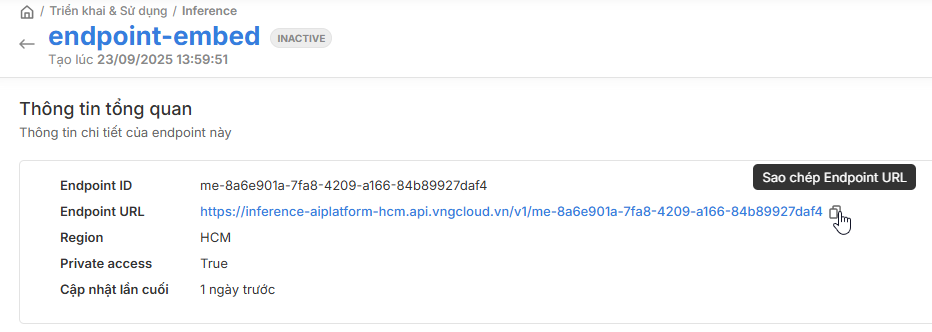
**You can obtain the Endpoint URL in two ways:**

1. Click the URL button from the Inference list.

<figure><img src="/files/7Z3Qtwl9sidsFoDNmiov" alt=""><figcaption></figcaption></figure>

2. Copy it from the details page of a specific Inference.

<figure><img src="/files/njIHr3FUINLiMQoMNlZ4" alt=""><figcaption></figcaption></figure>

### **Step 3: Call Inference**

After the Inference is Active and you have the Endpoint URL, you can start using it.

* Private Inference
  * ```
    curl --location 'https://inference-aiplatform-hcm.api.vngcloud.vn/v1/<uid-inference>' ^
    --header 'Authorization: Bearer <api-key>'
    ```
* Public Inference
  * ```
    curl --location 'https://inference-aiplatform-hcm.api.vngcloud.vn/v1/<uid-inference>'
    ```